
Crafting Error-Free Product Manuals
In an era when the quality of a product is measured not just by its functionality but also by the user’s ability to harness its capabilities effectively, creating error-free product manuals becomes indispensable in the consumer journey. These documents do more than accompany a product; they bridge the gap between its potential and practical use. Crafting error-free product manuals, therefore, is not merely an exercise in technical writing but a crucial phase in product development that significantly enhances user experience, facilitates seamless product usage, and minimizes customer support queries.
The challenge in creating product manuals lies in their technical accuracy and the information’s clarity, conciseness, and user-friendliness. A well-written manual easily navigates the user through setup, operation, troubleshooting, and maintenance, making the product more accessible to a broader audience. However, common pitfalls such as unclear instructions, grammatical errors, and inconsistent formatting can detract from the user experience, leading to frustration and reduced product satisfaction.
This guide provides a comprehensive approach to creating product manuals free from technical and grammatical errors. By focusing on understanding the audience, structuring content logically, ensuring technical accuracy, and adopting a clear and consistent writing style, this guide aims to equip creators with the tools necessary to produce manuals that inform and enhance the overall user experience. Let’s embark on a journey to explore the foundational steps and strategies for crafting product manuals that meet and exceed user expectations, emphasizing the importance of precision in every aspect of manual creation.

Part 1: Knowing Your Audience
The first step in crafting a practical product manual is understanding who will use it intensely. The audience’s technical proficiency needs and preferences should dictate the manual’s language, tone, and structure. This section explores techniques for audience analysis and how to tailor the manual’s content to meet their expectations.
Audience Analysis
Understanding the audience involves more than just knowing who they are. It requires insight into their background, experience levels with similar products, and potential use cases for the product at hand. Surveys, user interviews, and market research can provide valuable data about the audience, including their everyday questions, concerns, and where they might struggle with the product.
- Demographics and Technical Proficiency: Assess your audience’s age range, technical background, and familiarity with product-related terminology. A manual for a tech-savvy audience can afford to use industry jargon, whereas one intended for novices should simplify terms and include explanations.
- User Scenarios: Identify different scenarios in which the product will be used. Understanding the environment and context of use can help tailor the manual to address specific challenges or questions that may arise.
Language and Tone
Once you have a clear picture of your audience, the next step is to adapt the language and tone of your manual to match their needs. The goal is to communicate information in a way that is easily digestible, engaging, and devoid of ambiguities.
- Use of Clear and Simple Language: Opt for simple, direct language that conveys instructions or information without overwhelming the reader. Avoid technical jargon unless it is commonly understood by the audience, and always provide clear definitions for any specialized terms used.
- Adopting the Right Tone: The tone of your manual should reflect the brand’s voice and the product’s nature. While a professional tone may be appropriate for enterprise software, a more conversational or friendly tone might suit consumer electronics. Regardless of the tone, the underlying goal should always be clarity and ease of understanding.
- Consistency in Style and Terminology: Establish a consistent writing style and terminology early on. To avoid confusion, use the same terms to refer to the product, its features, and actions throughout the manual. This consistency reinforces the user’s understanding and makes the manual more intuitive.
In crafting a product manual, knowing your audience is the cornerstone upon which all other elements are built. It informs the content and the presentation and delivery of information. By aligning the manual with the audience’s expectations and needs, creators can ensure that it is a compelling companion to the product, enhancing the user’s experience and satisfaction.
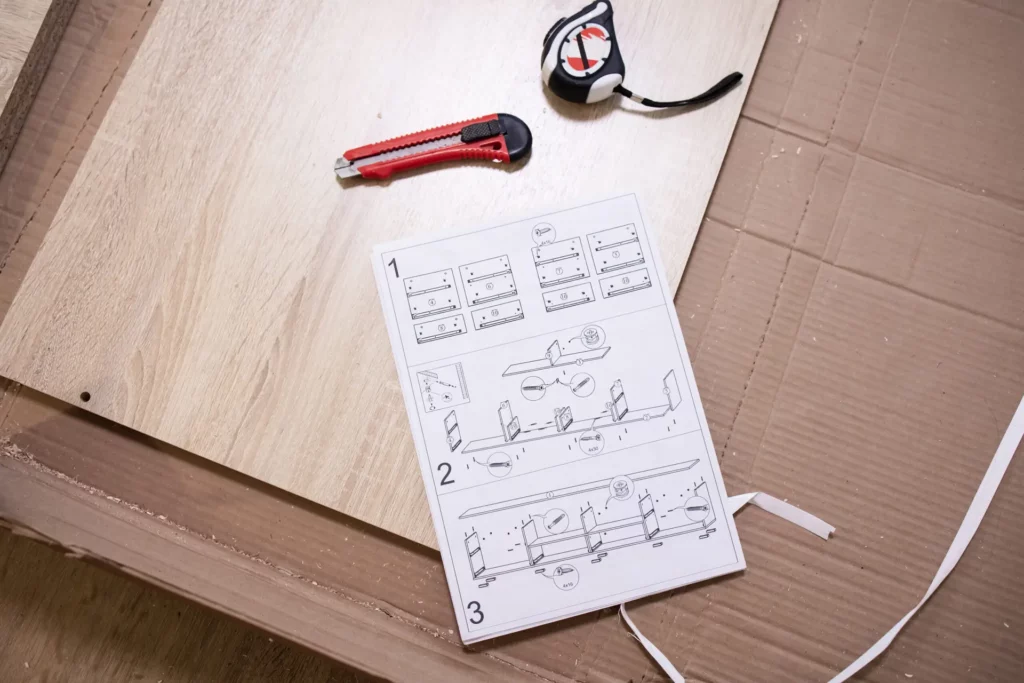
Part 2: Structuring Your Error-Free Product Manuals
An effectively structured manual is akin to a well-organized library where each book is easily locatable. This essential step in manual creation ensures that users can quickly find the information they need without frustration. A logically ordered manual enhances user experience, encouraging engagement with the product and reducing the reliance on customer support. This section delves into best practices for organizing content, ensuring logical flow, and adopting user-friendly formatting.
Organizing Content
The backbone of a user-friendly manual is its structure. Dividing the content into clear, logically arranged sections helps users easily navigate the manual. Consider the following strategies for organizing your manual:
- Identify Key Sections: Break down the manual into major sections that cover distinct aspects of the product, such as installation, operation, maintenance, and troubleshooting. Each section should cater to a specific area of user interest or concern.
- Use Informative Headings: Headings and subheadings should be descriptive and indicate the following content. They act as signposts that guide the reader through the manual, making it easier to scan for relevant information.
- Implement a Hierarchical Layout: Organize the information hierarchically, starting with general information and moving towards more specific details. Begin with an overview of the product, followed by setup instructions, essential functions, advanced features, and troubleshooting and maintenance.
Logical Flow
The arrangement of sections should follow a logical sequence that mirrors the typical user journey from unboxing the product to mastering its use. Ensuring a natural progression of topics facilitates understanding and reduces the cognitive load on the reader.
- From Simple to Complex: Start with foundational topics a user must understand before progressing to more advanced features or settings. This step-by-step approach helps build the user’s confidence and knowledge through the manual.
- Sequential Instructions: When detailing processes, such as setup or troubleshooting steps, present the information in the order it should be executed. Numbered lists can be particularly effective here, providing a clear, step-by-step guide that users can follow.
User-friendly Formatting
The visual presentation of the manual can significantly impact its usability. Adopt formatting techniques that enhance readability and make the manual more approachable.
- Bullet Points and Numbered Lists: Use bullet points for listing items or features and numbered lists for sequential instructions. This breaks down information into manageable chunks, making it easier to follow.
- Consistent Typography: Employ a consistent set of fonts, sizes, and styles (such as bold or italic for emphasis) throughout the manual. This consistency aids in distinguishing different types of information, such as notes, warnings, and tips.
- Whitespace and Margins: Generous use of whitespace around text and between sections can improve readability. Avoid cluttering pages with too much text or graphics, as this can overwhelm the reader.
By thoughtfully structuring your manual, you cater to the user’s immediate informational needs and enhance their learning experience. A well-organized manual becomes a valuable tool that empowers users, facilitating a deeper engagement with the product and fostering a positive brand perception.

Part 3: Writing Clear and Concise Instructions
Creating a clear and user-friendly instruction manual requires more than accurate information; it demands an easily digestible and actionable presentation. This segment explores crafting straightforward instructions, avoiding common pitfalls that can obscure understanding or intimidate the reader. The goal is to foster a seamless experience, empowering users to make the most of their product.
Writing Clear and Concise Instructions
The essence of an excellent product manual lies in its ability to communicate how to use the product effectively and efficiently. Achieving this requires a focus on clarity, simplicity, and precision in instruction writing.
Use of Active Voice
- Active vs. Passive Voice: Instructions should predominantly use the active voice to create direct, engaging sentences. For example, “Press the button to start” is more immediate and easier to understand than the passive “The button should be pressed to start.”
- Benefits: Active voice instructions reduce ambiguity, making who is acting and the expected outcome more straightforward. This direct approach helps keep the user’s attention and makes the steps easier to follow.
Simplicity and Precision
- Avoiding Technical Jargon: While some technical terms may be necessary, it’s crucial to ensure they are either widely understood by the target audience or clearly defined within the manual. Use layman’s terms to describe actions or parts of the product whenever possible.
- Clarifying Complex Terms: When technical jargon or specific terms are unavoidable, include a glossary or footnotes to define them. This practice ensures that all readers can follow along regardless of their prior knowledge.
- Being Precise: Each instruction should be precise to avoid misinterpretation. For example, instead of saying “use the device,” specify which part of the device to use, such as “rotate the left dial.”
Visual Aids
- Complementing Text with Images: Visuals such as diagrams, photographs, and icons can significantly enhance understanding, especially for complex tasks or when detailing the parts of a product. Ensure visuals are labeled or captioned correctly and referenced in the corresponding text.
- Creating Clear Diagrams: Diagrams should be straightforward, focusing on the relevant parts for the described step. Avoid overcrowding with unnecessary details that might distract or confuse the reader.
- Incorporation of Videos: For online manuals, embedding instructional videos for critical or complicated steps can provide additional clarity. Ensure videos are short, focused, and professionally produced to maintain the manual’s quality and effectiveness.
Best Practices for Instructional Clarity
To ensure that your manual’s instructions achieve the desired clarity and effectiveness, consider these additional strategies:
- Sequential Organization: Organize instructions in the order they should be executed. Use numbering for steps to guide the user through processes systematically.
- Consistent Format: Adopt a consistent format for presenting instructions. If you start with an action verb in one step, maintain that structure throughout. Consistency helps users quickly adapt to the manual’s style, facilitating easier comprehension.
- Testing Instructions: Before finalizing the manual, test the instructions in-house or with a focus group representative of the target audience. This testing can highlight areas of confusion or ambiguity that need refinement.
- Feedback Loops: Include a mechanism for users to provide feedback on the manual’s instructions. This continuous improvement loop can reveal insights into how instructions can be further clarified or simplified for better understanding.
Crafting clear and concise instructions within product manuals is pivotal in empowering users to utilize their products effectively. By prioritizing active voice, simplicity, precision, and the strategic use of visual aids, manufacturers can enhance the user experience, reduce customer service inquiries, and foster a positive brand image. Remember, the ultimate goal of your manual’s instructions is to inform and facilitate an enjoyable and successful interaction with your product.

Part 4: Technical Accuracy and Consistency
Technical accuracy and consistency throughout a product manual are foundational to its effectiveness and reliability. Users rely on manuals for correct, up-to-date information that guides them through using a product safely and efficiently. This section addresses the importance of meticulously verifying technical details and the need for a unified presentation style to ensure that users receive consistent and accurate guidance.
Ensuring Technical Accuracy
Technical accuracy is the cornerstone of a trustworthy manual. It involves more than just correct specifications; it encompasses a comprehensive verification of all procedural instructions, safety warnings, and troubleshooting advice to ensure they align with the product’s current design and operation.
- Fact-checking Processes: Establish a robust fact-checking protocol that involves technical experts reviewing the manual for accuracy in product descriptions, operational steps, and troubleshooting solutions. This review should also include verifying all numerical data, such as dimensions, weights, and performance metrics, to ensure they match the product specifications accurately.
- Updating Content: Products evolve, and manuals should, too. Regularly update the manual to reflect product updates, firmware upgrades, or changes in usage guidelines. Keeping the manual aligned with the product ensures users have the most current and accurate information.
Maintaining Consistency
Consistency in a product manual extends beyond the uniformity of technical information. It also applies to the manual’s language, formatting, and overall presentation style, collectively contributing to a cohesive and user-friendly reading experience.
- Terminology and Definitions: Use consistent terminology throughout the manual. If a specific name refers to a component, stick with that name to avoid confusion. Similarly, maintain consistent definitions for technical terms and operational instructions.
- Formatting Standards: Adhere to a predefined style guide that outlines formatting choices, such as font types and sizes, heading styles, and the layout of text and visuals. Consistent formatting helps users quickly locate information and understand its importance based on visual cues.
- Visual Style: Ensure that all diagrams, photographs, and other visual aids share a consistent visual style, including how annotations are made and steps are visually depicted. This consistency not only reinforces brand identity but also aids in user comprehension.
Implementing Best Practices for Accuracy and Consistency
To uphold the twin pillars of technical accuracy and consistency in your product manual, consider these best practices:
- Cross-Functional Review Teams: Involve a diverse team in the manual’s review process, including product designers, engineers, customer service representatives, and marketing professionals. This varied perspective can help identify inaccuracies and inconsistencies that might not be apparent from a single viewpoint.
- Version Control: Implement a version control system for your manual’s content, especially for products that undergo frequent updates. This system should track changes, revisions, and updates to ensure that all stakeholders are working from the latest version of the manual.
- User Feedback Loop: Incorporate user feedback into the review process. Users often identify discrepancies or areas of confusion that internal teams might overlook. Establish channels for continuously receiving and acting on user feedback to improve the manual’s accuracy and usability.
Focusing on technical accuracy and consistency throughout a product manual enhances its utility as a resource and reflects positively on the brand’s commitment to quality and user support. By diligently applying best practices for verifying information and maintaining a cohesive presentation, creators can ensure their manuals serve as reliable, user-friendly guides that demystify the product experience.
Given the constraints and to provide a cohesive completion to the guide on “Crafting Error-Free Product Manuals,” let’s dive into the final sections covering grammatical precision, usability testing, and the importance of maintaining a continuous improvement cycle for documentation.

Part 5: Grammatical Precision
Grammatical precision is not just about correctness for its own sake; it’s crucial for ensuring clarity and professionalism in product manuals. Grammatical errors can distract users, undermine confidence in the product, and sometimes cause misunderstandings about its use.
- Avoid Common Grammatical Mistakes: Common errors such as misplaced modifiers, incorrect verb tenses, and subject-verb disagreements can confuse readers and obscure instructions. Regularly review grammar rules that are frequently broken in technical writing.
- Editing and Proofreading: Incorporate a rigorous editing process to catch grammatical mistakes. Use both software tools and human proofreaders for this task. Different rounds of editing should focus on various aspects — one for technical accuracy, another for grammatical correctness, and so on.
- Simplify Language: Aim for simplicity to enhance understanding. Complex sentence structures and sophisticated vocabulary might impress a linguist but could perplex an average user. When in doubt, choose the more straightforward word or sentence structure.

Part 6: Usability Testing and Feedback
After ensuring your manual’s technical content and grammatical precision, the final crucial step is testing its usability with real users. This process can illuminate areas where the manual may fall short in clarity, comprehensiveness, or user-friendliness.
- Conduct Pilot Tests: Before the final release, conduct usability tests of the manual with a segment of your target audience. Observe as they attempt to use the manual to set up and use the product. Note any confusion or questions that arise.
- Gather and Implement Feedback: Solicit feedback from test participants and other stakeholders. Ask specific questions about the clarity of instructions, the helpfulness of diagrams, and the manual’s overall organization. Use this feedback to make necessary adjustments to the manual.
Conclusion
Crafting an error-free product manual is an integral part of product design that extends the utility and satisfaction derived from the product itself. By understanding your audience, structuring the manual for easy navigation, writing with clarity and precision, ensuring technical accuracy, and engaging in thorough grammatical review, you can create a document that guides and enhances the user experience.
The importance of integrating visual aids to support textual instructions cannot be overstated, as they play a critical role in bridging any gaps in understanding. Meanwhile, consistency in terminology and presentation ensures that the user isn’t lost in translation but instead finds a reliable guide in the manual.
Yet, the work doesn’t end once the manual is published. Usability testing and feedback incorporation are crucial for the manual’s iterative improvement. The goal is to create a living document that evolves with the product and its users, continually refining its communication ability.
Ultimately, the effort and resources invested in creating an outstanding manual reflect the brand’s commitment to quality and customer satisfaction. It’s not merely about preventing errors but about fostering a positive, long-lasting relationship with users, empowering them to make the most of their purchases. As such, crafting the perfect product manual is a journey worth taking, one that demands attention to detail, an understanding of users, and an unwavering commitment to excellence.
Remember, a product manual is more than just a set of instructions; it’s the voice of your product and brand. Making it as clear, accurate, and helpful as possible is not just good practice—it’s a vital aspect of product design that resonates with users long after their initial purchase.

Further Exploration
For those eager to dive deeper into the intricacies of English, countless resources await. From comprehensive grammar guides to interactive language learning platforms, the tools at your disposal are more accessible than ever. Engage with these materials, challenge yourself with new exercises, and remain curious and open to discovery. We offer a line of comprehensive grammar and punctuation courses and feature a mastery quiz bundle to cement your further mastery of grammar and punctuation. Feel free to access the endorsed resources below to enhance your learning experience.


